Search found 30 matches

by tchopper
Wed Sep 22, 2010 3:01 pm
Forum: Racks, Switching Systems and MIDI
Topic: GCX Signal Path Help | Buzz Hum and Tone Suck
Replies: 11
Views: 9154

Re: GCX Signal Path Help | Buzz Hum and Tone Suck

JohnClark wrote:Connecting directly to the amplifier after the Bad Horsie is to eliminate one possible ground loop and to just start simplifying the setup so we can get to the bottom of the problems you are having.
Gotcha - I will try as soon as I get home and post back later...

thanks for the help!
by tchopper
Wed Sep 22, 2010 2:47 pm
Forum: Racks, Switching Systems and MIDI
Topic: GCX Signal Path Help | Buzz Hum and Tone Suck
Replies: 11
Views: 9154

Re: GCX Signal Path Help | Buzz Hum and Tone Suck

JohnClark wrote:I see two things that are likely just errors on the drawing as they would cause there to likely be no sound and prevent amp channel switching.

-The Line Level output (black dashed line) of the Hush should run to the In of GCX Loop 2 in order to feed the front end of your effects loop effects chain.
-The Channel Select (green line) should be connected to either the Send(N.C.) or the Out(N.O.) of GCX Loop 1.

Some of your questions require quite involved answers as general explanation, so how about we first try to solve the rig problems and I will try to explain why they occurred in your setup as we find them?

Is there any difference if you run the output of the Bad Horsie directly to the instrument input of the amplifier?

I hope that helps!
John - you are correct on your first two points - they are both errors in my drawing - that "OUT" from the Hush goes to the "IN" of Loop 2 and the channel select is actually connected to Loop 1's "SEND".

To your question, I don't know, I'll give that a shot as soon as I get home. Now that I look at it, that makes sense. Aside from the additional distance the signal would have to travel, is there any other reason why making that switch would have an impact? (not questioning you - just trying to learn :D )

thanks!
by tchopper
Wed Sep 22, 2010 1:08 pm
Forum: Racks, Switching Systems and MIDI
Topic: GCX Signal Path Help | Buzz Hum and Tone Suck
Replies: 11
Views: 9154

GCX Signal Path Help | Buzz Hum and Tone Suck

OK, so I had my rig set to what I thought was OK :? , then I tried it out live and by mid-second set, everything just seemed like crap :evil: ... After we were done, I discussed a bunch of things with my keyboard player who is also familiar with racks and running sound - things like compression, ground loops (which I think I'm still a little fuzzy on), poweramp vs. preamps, yadda yadda... some of this stuff I knew, some I didn't. The one thing he did help me get comfortable over was that regardless, it was just gonna take time fiddlin' with knobs till things sounded right (I have no problem with troubleshooting or trial and error, but spending my time fiddlin' with knobs when there may be some other more fundamental problem that needs to be solved first, is something I find very frustrating). Which leads me to my post...

After that night I've spent a bunch of time trying different electrical configurations (for the ground loop issue), rearranging my rack, upgrading cables, etc, etc... I think I'm in a good place now, but I've not yet tried this out with the rest of the band playing (i.e., cranked at stage volume), so I'm not sure exactly what to expect in the way of feedback, hum, buzz, grounding issues, etc...

I've attached a worksheet of my setup as it stands (when you see it note that the Hush is in front of the poweramp AND at the end of the FX loop - the NS-2 is used as a mute switch). And for what it's worth, the Marshall is an AVT50 (not the JCM900 as it appears in the pic).

Please take a look and let me know if you see anything that is obviously wrong. Or if you see any potential issues. Or if you think there's a better way to run these pieces.

UPDATED GRAPHIC (FIXED TWO CONNECTION ERROS IN DRAWING)
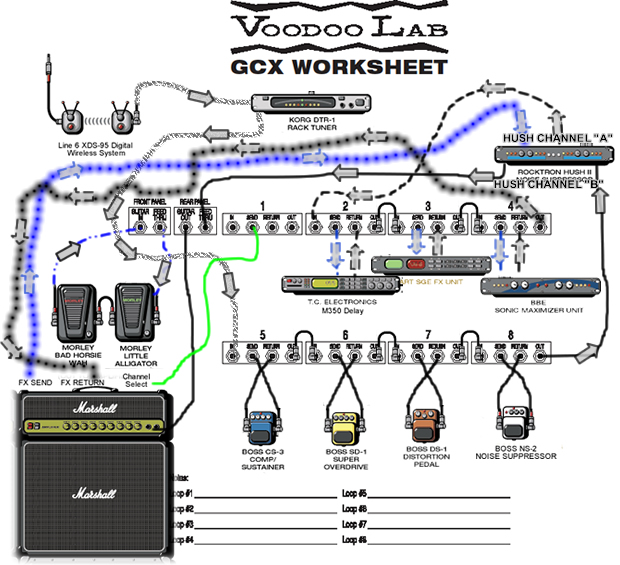
TMCRig.jpg
TMCRig.jpg (190.65 KiB) Viewed 7305 times
Also (for someone with no real electrical background, who is new to the concept), how do you tell the difference between ground loop buzz/hum vs. buzz/hum/feedback because you're playing distorted and loud?

When using noise suppressors how do you "find the line" between killing the hum but not killing your tone/level?

Thanks!

Tom

by tchopper
Sun Sep 12, 2010 3:06 pm
Forum: Racks, Switching Systems and MIDI
Topic: HELP! GCP/GCX Channel Switching (15-pin con'tion footswitch)
Replies: 1
Views: 2357

HELP! GCP/GCX Channel Switching (15-pin con'tion footswitch)

I have a Marshall AVT100 that I'd also like to use with my rack (for smaller gigs not requiring a full/half stack)... problem is, I have no idea how to (or if it's even possible to) use the GCP to switch the channels in this combo.

I don't need to use MIDI to deal with the onboard FX of the AVT100 (I plan on not using them - or at the very least, just using a set-n-forget basic reverb, etc - and using what I've set in my rack), but I would like to be able to switch the channels using the GCP.

Is this possible, or is using the AVT100 with the rack going to require using the GCP for the rack AND the Marshall footswitch (both operating independently)?

In short, is using the GCP and GCX possible with an amp that uses 15-pin "digital" footswitches?

THANKS!
by tchopper
Mon Aug 30, 2010 11:29 am
Forum: Rig Pictures
Topic: Some of my junk
Replies: 1
Views: 8006

Re: Some of my junk

what was the signal path of the rig with the Rocktron hush/Super C?
by tchopper
Mon Aug 09, 2010 11:30 am
Forum: Racks, Switching Systems and MIDI
Topic: GCX Routing// pedals, multiple multi-effects, Pa/Amp
Replies: 5
Views: 4233

Re: GCX Routing// pedals, multiple multi-effects, Pa/Amp

Okay - based on your suggestions, this is what I'm thinking... Let me know if it makes sense to you.

thanks again!!
by tchopper
Mon Aug 09, 2010 10:24 am
Forum: Racks, Switching Systems and MIDI
Topic: GCX Routing// pedals, multiple multi-effects, Pa/Amp
Replies: 5
Views: 4233

Re: GCX Routing// pedals, multiple multi-effects, Pa/Amp

Yup. It does have an effects loop.

Thanks for the info!

One other question though, would switching between using the effects loop of the head and running direct to the pa require much ( or any) rewiring? I'm trying to get this setup as "set and forget" as reasonably possible with use in both bands. (ie for the one band I want to use the head and for the other band I do not)

Also. Is the any further info (or links) you could provide on the whole "line level" matter. A lot of this Is new to me.

Thanks again !!
by tchopper
Mon Aug 09, 2010 9:48 am
Forum: Racks, Switching Systems and MIDI
Topic: GCX Routing// pedals, multiple multi-effects, Pa/Amp
Replies: 5
Views: 4233

Re: GCX Routing// pedals, multiple multi-effects, Pa/Amp

JohnClark wrote:If you have an effects loop, you should at least try out the two different routings. The processors are all candidates for running in the effects loop. I hope that helps!
I presume you mean using the effects loop of the Amp Head?

Are you suggesting (when using the head) running the entire chain through the effects loop, or only a portion of the chain described above?

thanks!
by tchopper
Mon Aug 09, 2010 9:16 am
Forum: Racks, Switching Systems and MIDI
Topic: GCX Routing// pedals, multiple multi-effects, Pa/Amp
Replies: 5
Views: 4233

GCX Routing// pedals, multiple multi-effects, Pa/Amp

I'm in the process of reconfiguring my rack. I'm trying to get as much versatility out of what I have, as I record and play in two very different bands (one rock/metal and the other blues/funk/R&B, etc).

I have attached a CGX worksheet with what I'm thinking... I'm hoping to pull out anything from acoustic to metal to funk all on the fly, ultimately going into either 1) in front of a Marshall 50W head OR direct to PA (depending on which band I pay in.
TMCLoops.jpg
The main reason for the multiple effects processors is 1) there are tones in each I really love and 2) if one craps out, there's always a back-up (of sorts)

If anyone has any comments about going in front of the head, I'd love to hear them (I'd hate to get some great stuff outta the rack only to have it sound like ass passing through the head).

Not planning on anything fancy here (no w/d/w, stereo - for now), just versatility...

thanks for any input!!!

Tom
by tchopper
Fri May 01, 2009 5:54 am
Forum: Racks, Switching Systems and MIDI
Topic: POD XT Live, Ground Control setup
Replies: 3
Views: 6552

POD XT Live, Ground Control setup

I am very much considering purchasing both the MIDI Ground Controller as well as the GCX. However, I am rather new to MIDI and making this purchase would be dependant on being able to use the equipment as follows: My intention is to have a one-stop-shop way to switch among various combinations of equipment (that would all be stored compactly in a rack), including multiple Boss stomp boxes I’ve amassed, clean and dirty channels on one or more amps as well as my POD XT Live (the floor version of the rack Pro), of which I’ve downloaded and tweaked hundreds of presets.

I’m fairly sure this will the use of multiple GCX units, but my real question is, is there available a setup PDF file, like the ones available on this page (http://www.voodoolab.com/gcx.htm), that factors in the use of a POD XT Live , where the POD functionality in the Ground Controller is not turned on (i.e., for the POD, I’m looking to use the Ground Controller to switch among preexisting presets in the POD. Those presets would be edited via the POD, not the Ground controller. So, if I understand how the product works, buttons 1-8 would be for turning loops on and off – not turning on and off POD features such as AMP, COMP, WAH, etc.; switching through the POD presets would be effected by switching through the Ground Control’s banks/channels).

I would also envision being able to use expression pedals for multiple items, including, but not limited to, a Morley Bad Horsie wah, a Digitech Whammy pedal, Volume and Expression parameters stored in preprogrammed POD XT Live presets, etc. First, is the expression capability of the Ground Control robust enough for this; second, is this also something that can be documented in the above requested PDF?

I have spent much time on the internet trying to find information on or about this type of setup (Controller, GCX(s), Expression Pedals, stomp boxes, amps and a POD XT Live) and I’ve not been able to find anything that adequately addresses this. I’m sure it’d be easier if I was using a rack POD Pro (which I presume was designed to be controlled via MIDI), but why do that if I can use the POD I’ve been using with the same end result?

Or, are there any site(s) that I can go to that would help me with my questions?